Product / Parse & Extract
Extract Every Debt Tranche from Any Bankruptcy Filing
Upload a disclosure statement or plan of reorganization. TrancheLab parses the PDF, classifies sections, filters noise, and returns a structured capital table with confidence scores on every field. Minutes, not hours.
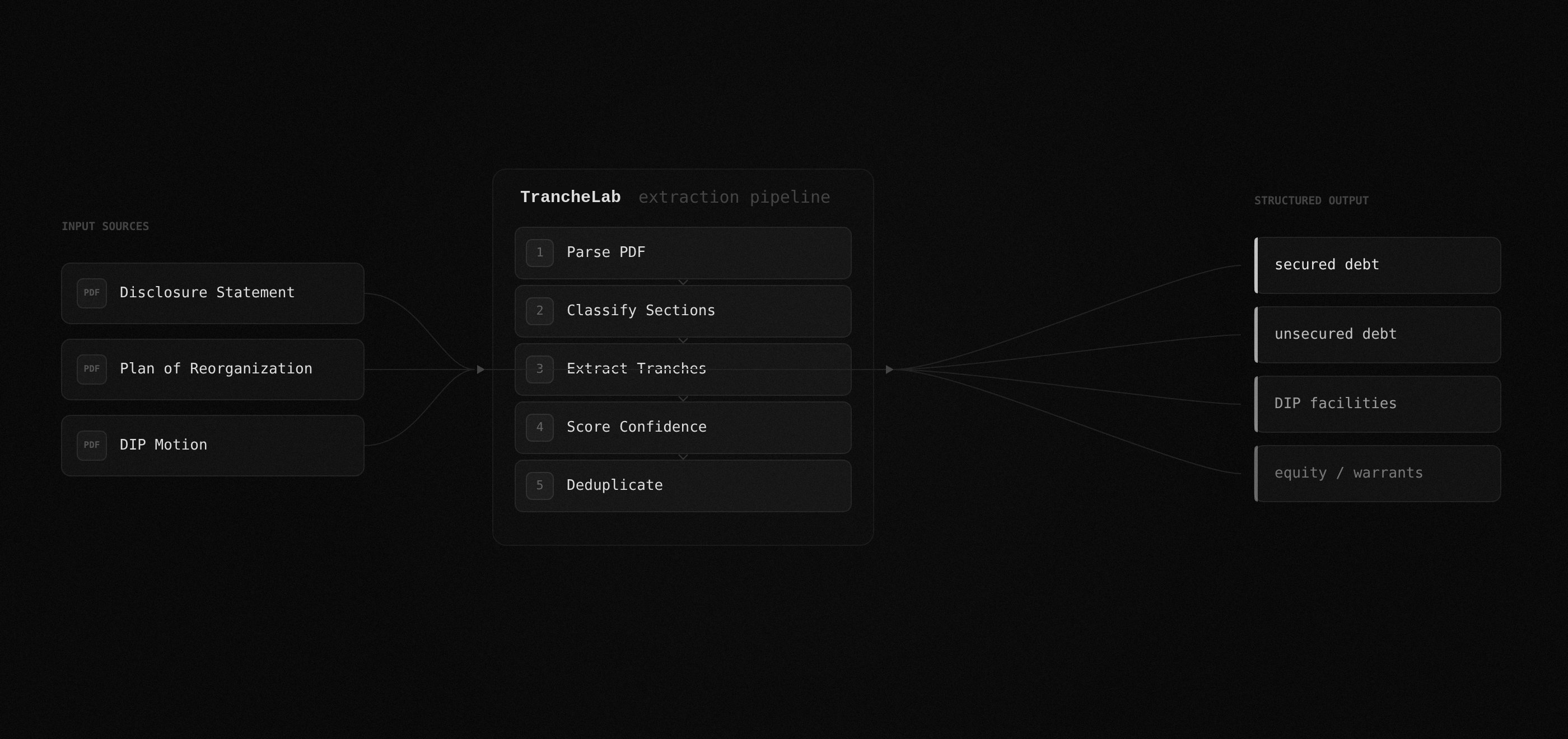
How TrancheLab Extract Works
Step 1:
Upload your filing
Drop a disclosure statement, plan of reorganization, or DIP order. TrancheLab accepts any PDF, including scanned documents. No preprocessing required.
Docs: Supported Filing Types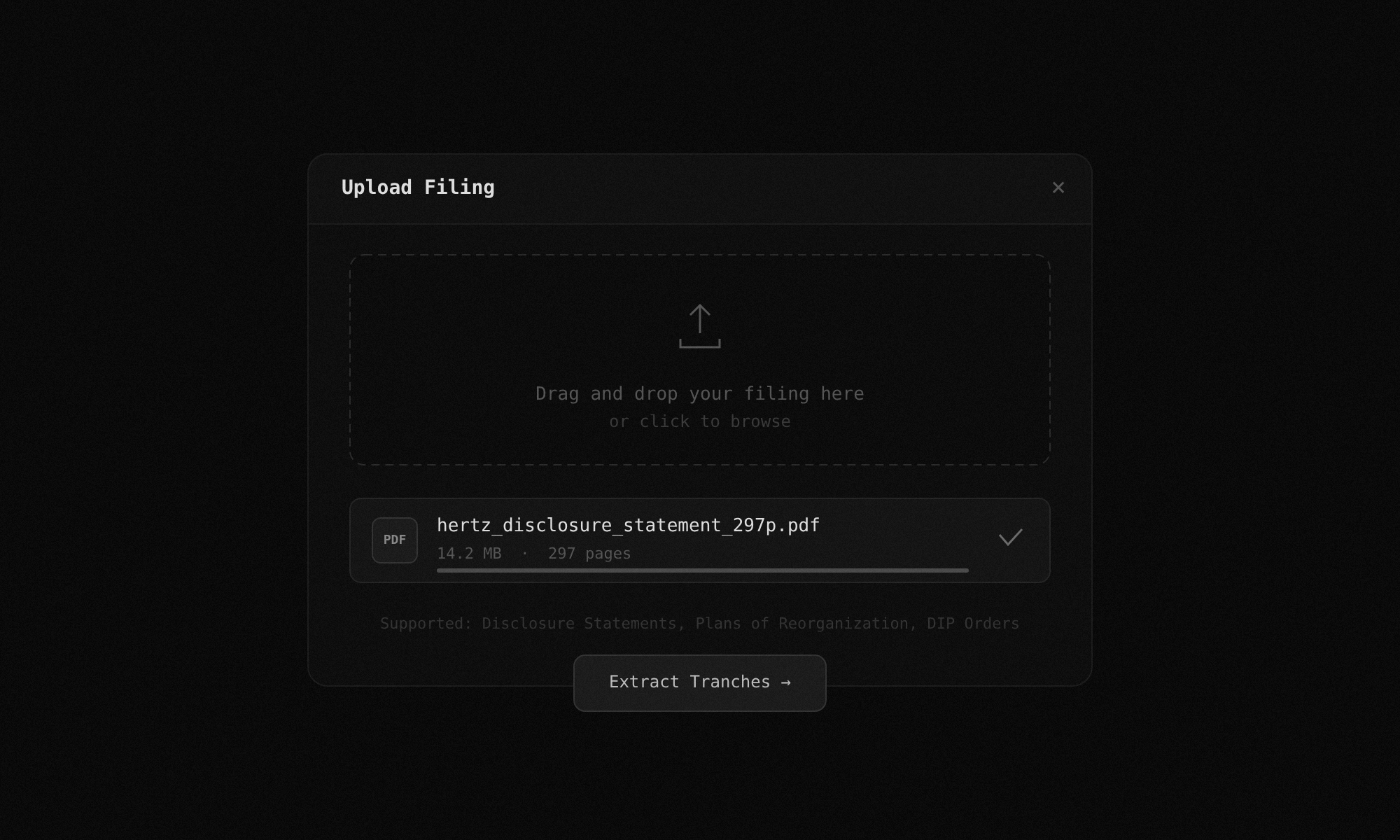
Step 2:
PDF parsing with OCR fallback
TrancheLab runs a three-stage parsing chain: PyMuPDF for native text, pdfminer for layout-sensitive extraction, and Tesseract OCR as a fallback for scanned pages. Bad scans do not break the pipeline. Pages with fewer than 80 characters of extracted text automatically trigger OCR.
Docs: PDF Parsing Chain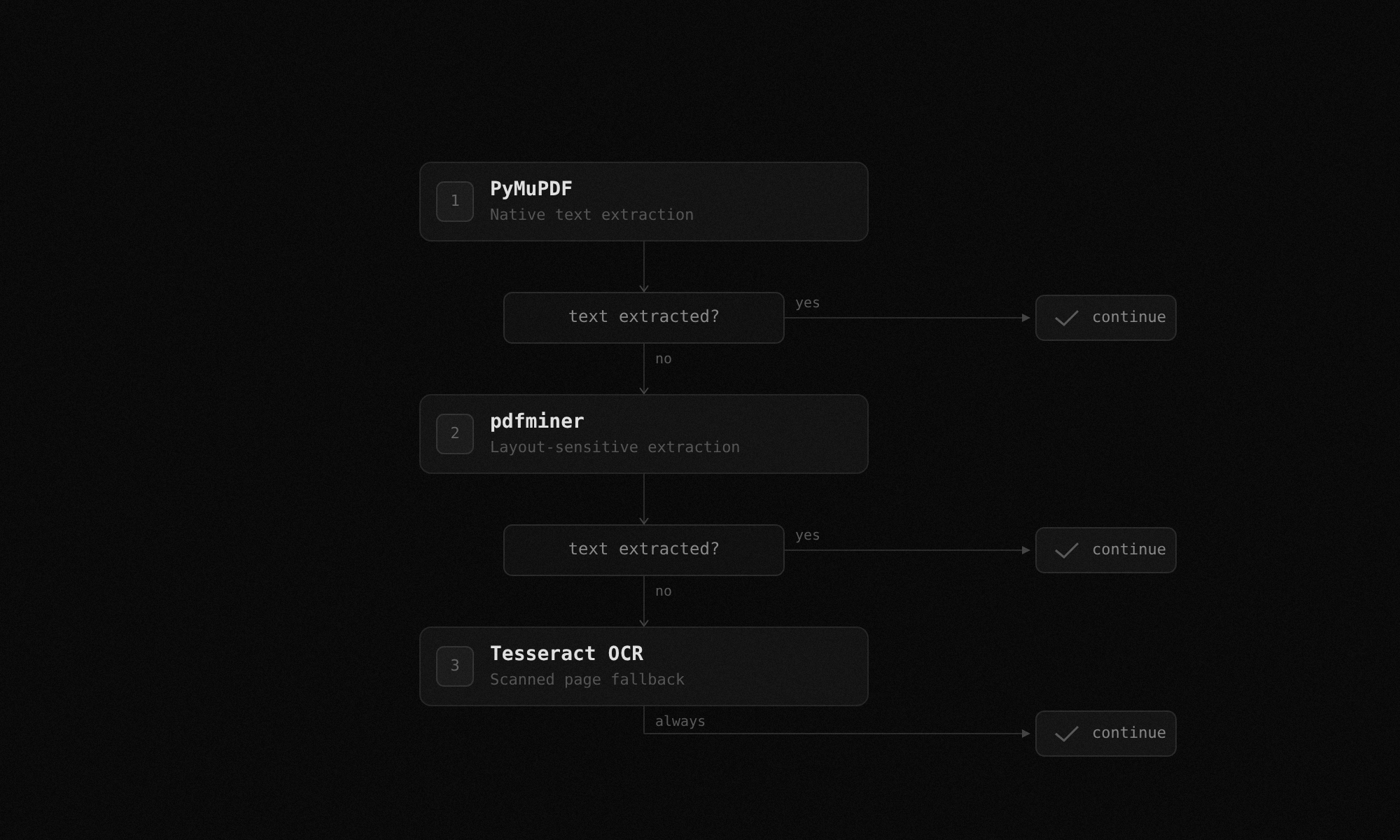
Step 3:
Section classification and pre-filter
Before any LLM call, a deterministic classifier scans every page and tags it: capital structure, classification of claims, recovery analysis, risk factors, legal boilerplate. Only relevant pages pass through. A 297-page filing typically reduces to approximately 40 pages.
Docs: Section Classifier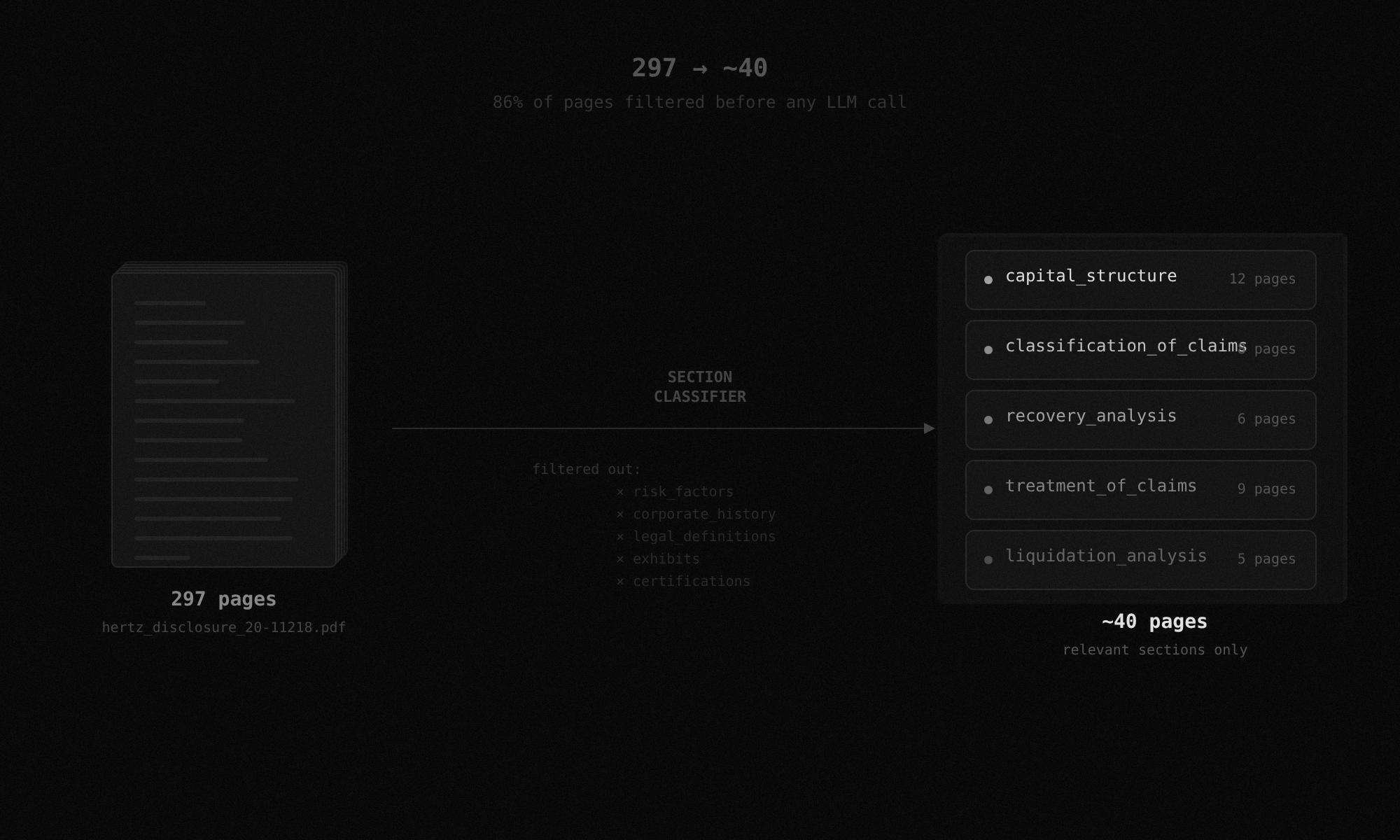
Step 4:
Tranche extraction with confidence scoring
The extraction pipeline identifies every debt tranche and pulls face amounts, outstanding balances, interest rates, maturity dates, seniority rankings, and recovery estimates where disclosed. Every extracted value gets a deterministic confidence score from 0.0 to 1.0. If a value has a raw text excerpt backing it, confidence reflects match quality. If it does not, confidence is forced to 0.
Docs: Confidence Calibration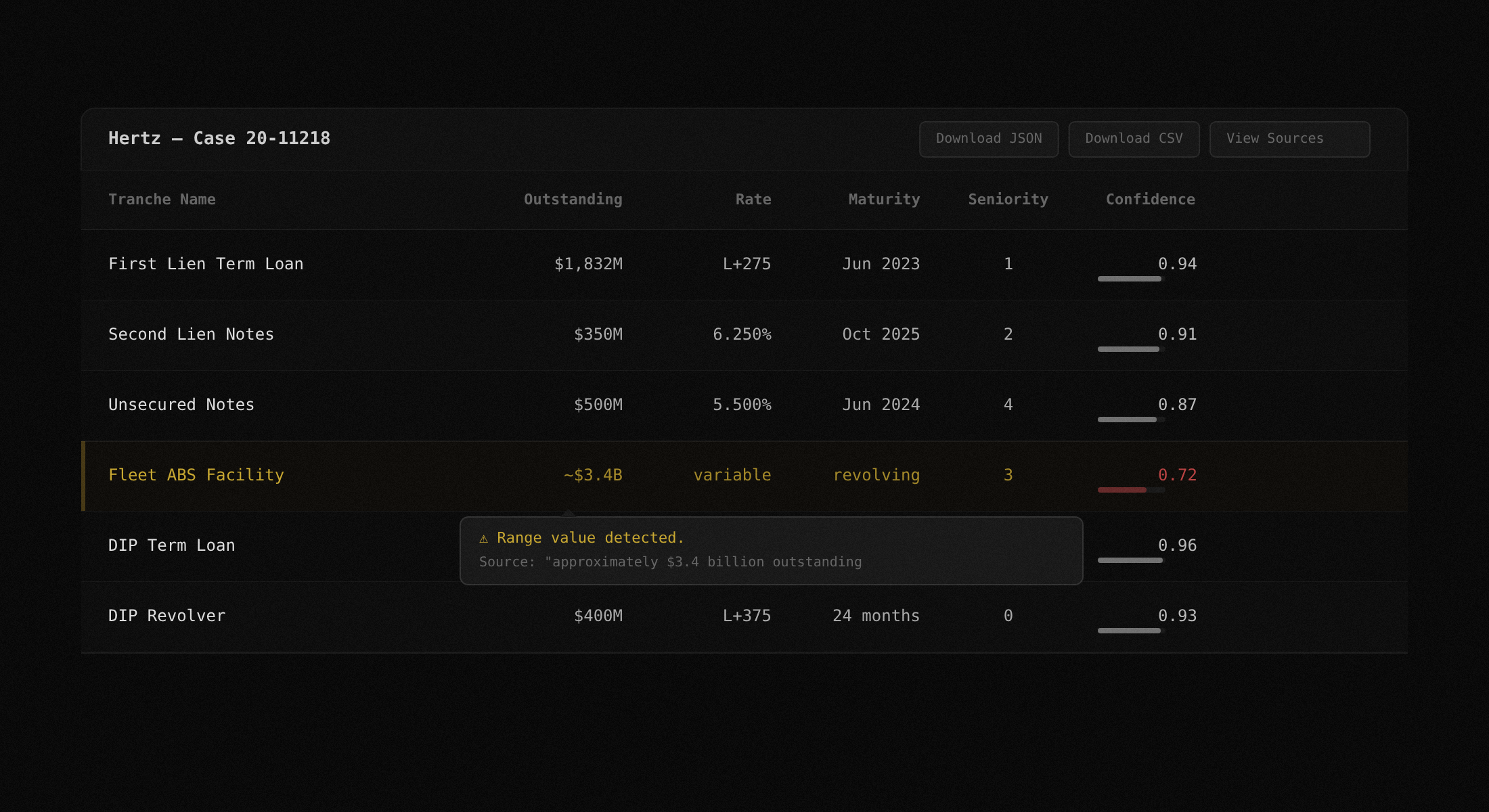
Step 5:
Fuzzy deduplication
Levenshtein matching groups tranches that appear under different names across sections or plan amendments. 'First Lien Notes,' 'Existing First Lien Facility,' and 'Prepetition First Lien Credit Agreement' resolve to one entry instead of three. Amounts must be within 5% to merge. When both amounts are missing, name similarity must exceed 90%.
Docs: Deduplication Engine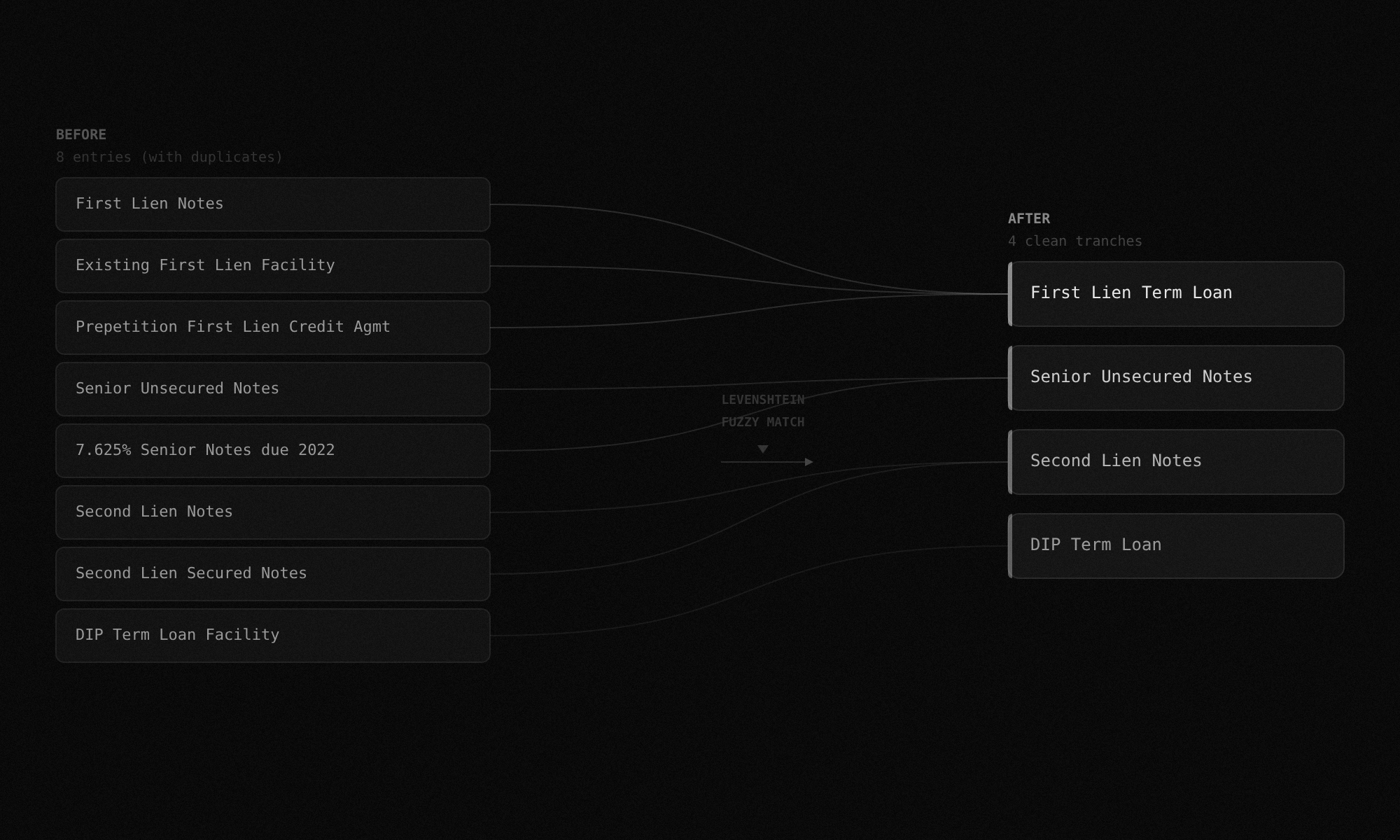
Step 6:
Structured output
Results export as a sortable data table in the UI, downloadable JSON, or CSV. Every field links back to the source text excerpt from the filing. Click any row to see the exact sentence the value was extracted from, the page number, and the confidence breakdown.
Docs: API ReferenceExtraction pipeline architecture
Your filing goes through a deterministic pre-filter before any LLM call. Extraction runs on the filtered pages only.
PDF Upload
Parse Chain
PyMuPDF > pdfminer > Tesseract
Section Classifier
deterministic
LLM Extraction
Groq / llama-3.3-70b
Only ~40 of 297 pages reach this stage
Confidence + Dedup
scored 0.0 to 1.0
Levenshtein fuzzy matching on tranche names
Structured Output
Table / JSON / CSV
Supported filing types
Upload any bankruptcy document. More filing types added based on demand.
Disclosure Statements
● LIVEPlans of Reorganization
● LIVEDIP Orders
● COMING SOONRSA Exhibits
● BY REQUESTFirst Day Declarations
● COMING SOONAmended Plans
● COMING SOONBar Date Motions
● BY REQUESTCash Collateral Orders
● BY REQUESTLiquidating Plans
● COMING SOONTrancheLab vs. doing it yourself
Compare TrancheLab to manual analyst work and existing terminal subscriptions.
| Capability | TrancheLab | Manual (Analyst) | Terminal Subscription |
|---|---|---|---|
| Time to structured output | < 10 minutes | 4 to 6 hours | Varies (if available) |
| Confidence scoring | 0.0 to 1.0 per field | Analyst judgment | Not offered |
| OCR for scanned filings | Automatic fallback | Manual retype | -Depends on vendor |
| Deduplication across amendments | Automatic (Levenshtein) | Manual cross-reference | Not offered |
| Source text excerpts | Linked per value | -Analyst notes | -Sometimes |
| Cost | API call | Analyst hourly rate | $30K to $50K/year |
| Coverage | Any Chapter 11 filing | Any Chapter 11 filing | Curated universe only |
FAQ
TrancheLab runs a three-stage parsing chain. It tries PyMuPDF first for native text extraction, falls back to pdfminer for layout-sensitive documents, and uses Tesseract OCR as a final fallback for scanned pages. You do not need to preprocess your files.
A confidence score of 0 means TrancheLab could not find a raw text excerpt in the filing to back the extracted value. This can happen when a value is inferred from context rather than stated explicitly. Rather than guess, TrancheLab flags it.
The deduplication engine uses Levenshtein fuzzy matching to group tranches that appear under slightly different names across sections or plan amendments. You get one clean entry per tranche, not three near-duplicates.
Yes. The diff engine accepts two filings and highlights changes in tranche definitions, recovery estimates, and creditor class treatments between versions.
Currently, disclosure statements and plans of reorganization are fully supported. DIP orders, amended plans, liquidating plans, and first day declarations are in development. RSA exhibits, cash collateral orders, and bar date motions are available by request.
Yes. Subscribe to a case via the API after extracting it. TrancheLab polls CourtListener every 6 hours for new docket activity on subscribed cases. When a new filing is detected, it is automatically extracted and diffed against the previous version. If changes are found, you receive an email with the changed tranches, field-level diffs, and a link to view the comparison.
Start Extracting Capital Structure Data
See how TrancheLab turns hundreds of pages into a structured tranche table with confidence scores, in minutes.
Book a Demo